Claude Code配置工程:从“裸奔”到“神装”的八层效率架构
导语:不要再迷信一句完美的提示词了。真正的效率分水岭,在于你是否为Claude Code搭建了一套系统化的配置栈。本文详解经过半年打磨的八层架构,让你的AI编程从“能用”一跃成为“降维打击”的生产力神器。
别再纠结于那一句“完美”的提示词了。我调试了6个月Claude Code才明白:真正拉开差距的,是你有没有把.claude/配置栈搭起来。一个配置齐全的仓库,能让AI编程效率实现降维打击——同样一个复杂任务,有人要耗一下午,有人却能在90分钟内端到端交付PR。差别不在临时输入的prompt,而在那套没人愿意花时间搭建的系统。
配置目录总览:麻雀虽小,五脏俱全
一个典型的高效配置栈长这样:
.claude/
├── CLAUDE.md
├── rules/
│   ├── retrieval.md
│   ├── tests.md
│   └── python-types.md
├── agents/
│   ├── retrieval-reviewer.md
│   ├── prompt-auditor.md
│   └── eval-runner.md
├── skills/
│   ├── new-rag-eval/
│   │   └── SKILL.md
│   └── claude-pr-checklist/
│       └── SKILL.md
├── settings.json
└── .mcp.json
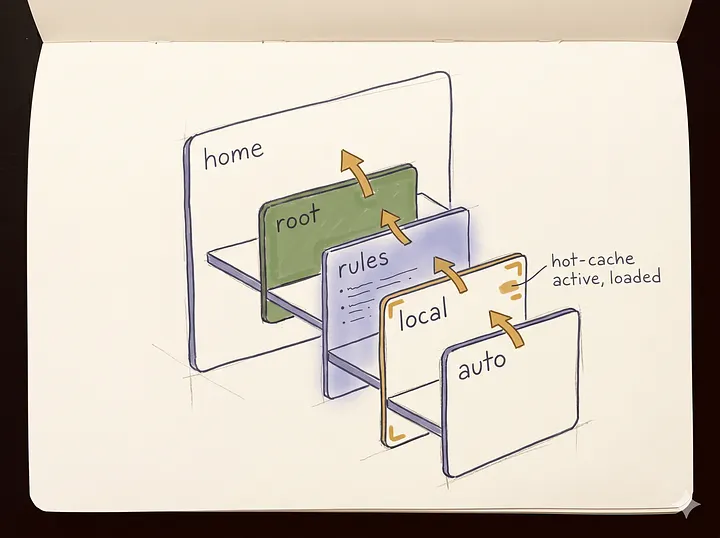
重点不是文件多,而是每个文件都短、准、有边界。主记忆文件控制在500 tokens以下,规则只负责特定路径,子代理约30行,钩子仅做预检和格式化,MCP服务器只保留5个真正有用的。
第一层:精简Memory,告别Token浪费
项目根目录的CLAUDE.md在每次会话启动时加载,永久消耗token。很多团队把它塞成“工程维基”,瞬间污染上下文。一旦超过约500 tokens,缓存命中率会明显下降,而新版Opus 4.7分词器还会把已有提示映射为1.0~1.35倍tokens。不控制体积,代价巨大。
根记忆文件应控制在200行以内,语气命令式,只写能改变行为的规则,例如:“所有函数必须有TypeScript类型注解”。不要写“写干净代码”这类虚的建议。下例是一个RAG服务的最小可用CLAUDE.md,清晰告知Agent目录职责、约束和引用规范:
# citation-rag

Retrieval + answer-generation service. LangGraph-based pipeline,
PostgreSQL+pgvector retrieval, Gemini answer generation, eval harness in `evals/`.

## Layout
- `services/retrieval/`  — chunking, embedding, reranker, citation packer
- `services/answer/`     — prompt templates, generator node, guardrails
- `shared/`              — schemas, tracing, settings
- `evals/`               — golden sets, runners, scoring

## Build & test
- Install: `uv sync`
- Unit tests: `uv run pytest -q`
- Eval harness: `uv run python -m evals.run --suite citations`
- Lint + types: `uv run ruff format . && uv run mypy .`

## Canonical conventions
- The canonical answer prompt lives at `services/answer/prompts/v4.md`. Do not edit `v3.md` because it is frozen for regression evals.
- All LLM outputs are validated with the pydantic models in `shared/schemas/answers.py`.
- Retrieval always returns `Chunk` objects with a `citation_id`. The answer node must emit citations using those exact ids.

## Guardrails (Claude: follow these literally)
- Never bump the model version string without updating `evals/snapshots/${version}.json` in the same commit.
- Never introduce network calls inside `tests/unit/`. Use fixtures in `tests/fixtures/` and fakes in `tests/fakes/`.
- Prefer editing existing modules over adding new top-level packages.
- If a change touches `services/retrieval/`, read `.claude/rules/retrieval.md` before planning.
- Keep functions under ~40 lines. Split by responsibility, not by length.

## Before opening a PR
- Run the eval harness and attach the diff output to the PR body.
- Update `CHANGELOG.md` under `## Unreleased`.
- Use the `claude-pr-checklist` skill.
这里没有一句废话,全是高频、关键的决策规则。
第二层:路径规划规则,按需加载
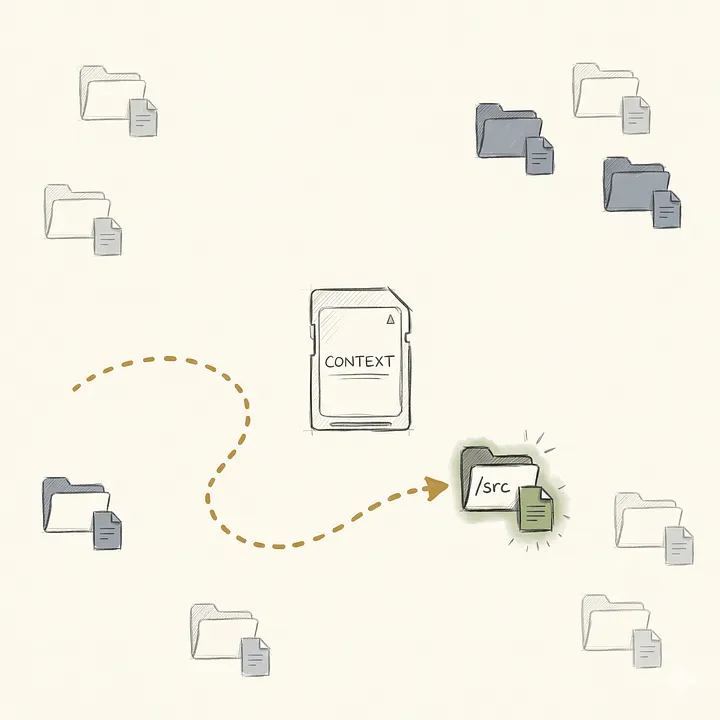
把文件级、目录级的特殊规则塞进CLAUDE.md会继续膨胀上下文。正确做法是用路径作用域规则(rules/),通过YAML frontmatter定义glob,只有匹配文件时规则才加载,平时不消耗token。例如,针对检索服务的规则:
---
name: retrieval-rules
description: Conventions for services/retrieval/**. Loaded only when Claude is editing or planning changes inside the retrieval service.
globs:
  - "services/retrieval/**"
  - "tests/retrieval/**"
---
# Retrieval service rules
## Chunking
- Use `shared/chunking.semantic_chunker` for all document ingest. Do not introduce a second chunker without updating the eval snapshot.
- Chunk size target: 512 tokens, 64 overlap. Changes require an ADR.
## Reranker
- The reranker interface is `services/retrieval/reranker.Reranker`. New backends must implement it, not parallel it.
- Never rerank more than the top 50 hits from vector search. Rerank latency is the #1 service SLO risk.
## Citations
- Every `Chunk` returned from retrieval must carry a stable `citation_id`.
- Citation ids are produced by `shared/citations.make_citation_id`. Do not hand-roll ids anywhere else.
- The answer node assumes `citation_id` is URL-safe. Do not change that without updating `services/answer/citation_packer.py` in the same diff.
## Tests
- Unit tests for retrieval must never hit the embedding API. Use the fake embedder in `tests/fakes/embeddings.py`.
- Integration tests live under `tests/retrieval/integration/` and are opt-in via `pytest -m integration`.
三四个短文件,远胜过一个大根文件,Token节省在每一轮对话都会复利。
第三层:Plan Mode,先想再做
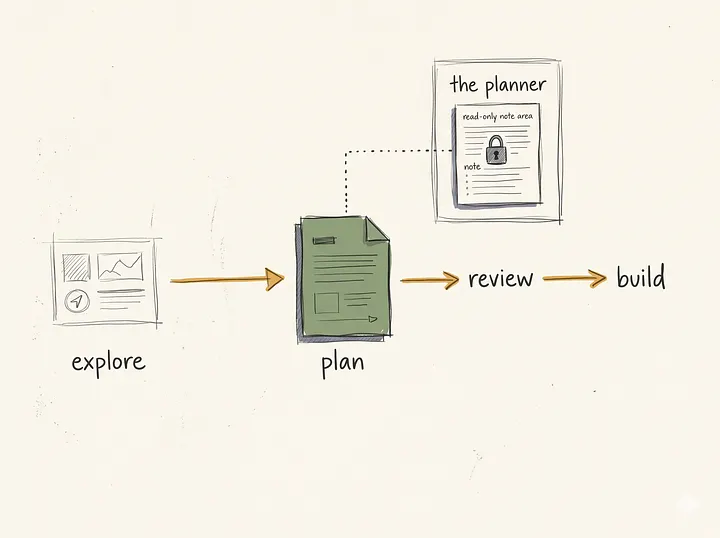
很多人不用Plan Mode,直接让Claude开始改文件——这很刺激,也很危险。Plan Mode将“思考”与“行动”分离,生成可审阅的计划文档,确认后才允许修改。其提供三个层级:Simple(单文件短任务)、Visual(多文件结构修改)、Deep(跨服务变更)。Deep Plan会使用只读子代理进行依赖梳理和架构审查,避免误改代码。
以RAG服务为例,Deep Plan能追踪现有答案生成路径,输出明确的编辑列表、评估项和PR描述草稿。你审查通过,锁定方案,真正的修改只在退出Plan Mode后发生。看似慢,实际是在防止更慢的错误——AI最贵的错误不是不知道,而是太自信地直接改。
第四层:定制子代理,分工降本
Claude Code内置了explore、general-purpose、code-reviewer等子代理,但真正的威力在于自定义。当某类任务反复出现,或需要一个有明确工具限制的角色时,就该写定制子代理。例如,检索代码审查代理:只读,限定工具,使用更便宜的Sonnet模型,与主循环的昂贵模型分工。
---
name: retrieval-reviewer
description: Reviews changes under services/retrieval/ for chunking, reranker, and citation-contract regressions. Read-only.
tools: Read, Grep, Glob, Bash(git diff:*), Bash(uv run pytest:*)
model: sonnet
---
You are a retrieval-service reviewer for the citation-rag repo.
Scope:
- Only review files under `services/retrieval/**` and their tests.
- Do not comment on unrelated files even if they appear in the diff.

Review checklist, in order:
1. Chunking: does the change respect the 512/64 target, and does it keep `shared.chunking.semantic_chunker` as the single entry point?
2. Reranker: if the reranker interface changed, is every implementation updated, and is the top-k cap still ≤ 50?
3. Citations: every returned `Chunk` must have a `citation_id` produced by `shared.citations.make_citation_id`. Flag any hand-rolled ids.
4. Tests: no new network calls in unit tests. Integration tests gated by `pytest -m integration`.
5. Eval impact: if behavior changed, confirm `evals/snapshots/*.json` has been regenerated in the same commit.

Output format:
- A short "Verdict" (pass / needs-changes / blocker).
- Bullet list of findings, each with the file path and a one-line fix.
- Do not suggest unrelated refactors.
当代理修改检索逻辑后,自动调用此子代理,提前发现手写ID等违规,避免回滚。
第五层:Skills,将稳定工作流打包
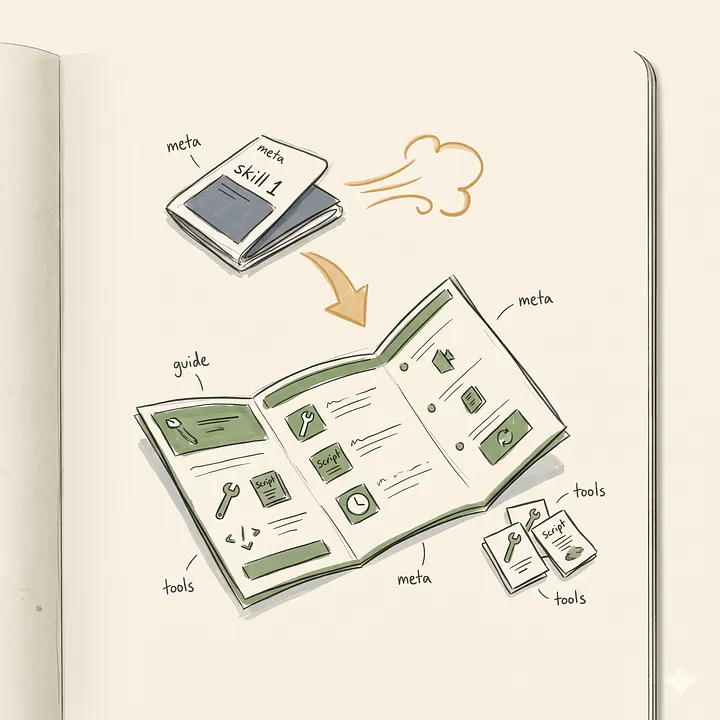
Skill像一个函数:通过名字触发,内部包含指令和可能绑定的脚本。其利用渐进式披露:元数据在会话启动时加载,指令仅在触发时加载,资源只在引用时加载。因此安装50个skills也不会显著增加背景token消耗。
例如,新建评估用例的skill:
---
name: new-rag-eval
description: Support a new RAG eval case from a golden example, wire it into the eval harness, run it against the current pipeline, and write a result summary.
allowed-tools: Read, Write, Edit, Bash(uv run:*), Bash(git add:*)
---
# new-rag-eval
## When to use
Trigger when the user wants to add a new eval case to `evals/suites/citations/` or reproduce a regression.

## Inputs to gather first
1. A natural-language description of the query.
2. The expected citation ids (or the expected answer text).
3. Optional: the failing trace id from production.

## Steps
1. Read `evals/templates/case.json` — this is the case template.
2. Ask the user for the query, expected citations, and any notes.
3. Write a new case file at `evals/suites/citations/.json` using the template.
4. Run the harness for just this case: `uv run python -m evals.run --suite citations --case `
5. Parse the JSON output at `evals/out/.json`. Summarize: pass/fail, grounded-citation rate, unsupported-claim rate, latency outliers.
6. If failing, add a short "why this is expected to fail today" note to the case file under `notes:`.
7. Stage the new case with `git add evals/suites/citations/.json`.

## Do not
- Do not edit `evals/templates/case.json`.
- Do not touch other eval suites.
- Do not open a PR from this skill. The PR flow lives in the `claude-pr-checklist` skill.
允许的工具列表清晰限制其权限,PR流程被明确指向另一个skill,实现确定性工作流。
第六层:Hooks,给概率系统加确定性护栏
Hooks让代理在无人值守时安全运行。写在settings.json中,响应事件如SessionStart、UserPromptSubmit、ToolUse。最新版还支持Safety Rejection Hook。
重要新能力:Deferred Permissions。pre-tool hook可返回defer,使headless模式下暂停,人工审查并批准后,代理从原处继续运行。此前夜间任务要么跳过权限(危险),要么凌晨3点失败。
实用配置:一个post-tool hook,在每次写文件后自动运行格式化工具;一个pre-tool hook,拦截对main分支的直接推送。
{
  "hooks": {
    "PreToolUse": [
      {
        "matcher": "Bash",
        "hooks": [
          {
            "type": "command",
            "command": ".claude/hooks/gate_git_push.sh"
          }
        ]
      }
    ],
    "PostToolUse": [
      {
        "matcher": "Write|Edit|MultiEdit",
        "hooks": [
          {
            "type": "command",
            "command": "uv run ruff format $CLAUDE_TOOL_FILE_PATH >/dev/null 2>&1 || true"
          }
        ]
      }
    ],
    "PermissionDenied": [
      {
        "hooks": [
          {
            "type": "command",
            "command": "jq -c . >> .claude/logs/denied.jsonl"
          }
        ]
      }
    ]
  }
}
Gate脚本会在检测到push to main时返回defer,并暂停会话。人工批准后,通过claude --resume继续。
第七层:MCP Server,少即是多
Model Context Protocol将代理接入外部工具。每个server都会提供工具schema,持续消耗上下文token。Tool Search技术可降低85%消耗,但最佳策略仍是:“少装”。Anthopic文档指出,50个工具每轮可能消耗10,000~20,000 token。认真做工程,5个server足矣:
- 代码图谱server(带持久记忆)
- GitHub server(分支与提交管理)
- File system server(跨目录访问)
- 实时网络搜索server
- 专用文档拉取server
配置示例:
{
  "mcpServers": {
    "vexp": {
      "command": "npx",
      "args": ["-y", "@vexp/mcp-server@latest"],
      "env": {
        "VEXP_PROJECT": "citation-rag",
        "VEXP_MEMORY_DIR": ".vexp"
      }
    },
    "github": {
      "command": "npx",
      "args": ["-y", "@modelcontextprotocol/server-github"],
      "env": {
        "GITHUB_PERSONAL_ACCESS_TOKEN": "${GITHUB_TOKEN}"
      }
    },
    "filesystem": {
      "command": "npx",
      "args": ["-y", "@modelcontextprotocol/server-filesystem", "${HOME}/code/citation-rag", "${HOME}/code/shared-prompts"]
    },
    "brave-search": {
      "command": "npx",
      "args": ["-y", "@modelcontextprotocol/server-brave-search"],
      "env": { "BRAVE_API_KEY": "${BRAVE_API_KEY}" }
    },
    "context7": {
      "command": "npx",
      "args": ["-y", "@upstash/context7-mcp@latest"]
    }
  }
}
像vexp这样的代码图谱server,据其benchmark可降低65%~70% token消耗。
第八层:并行工作树与无头自动化
Worktree让你不再等待代理逐字输出。一条命令即可创建分支、工作树和独立会话,每个窗格保留自己的编辑器和运行进程。可将任务拆分为并行分支:主窗格实现核心变更,第二个窗格重写评估,第三个窗格添加追踪,第四个窗格起草PR。只要界限清晰,冲突很少。
Headless mode则让代理在CI管道中非交互运行,搭配allowed-tools和hooks实现夜间自动化。例如,GitHub Actions每晚评估并起草PR:
name: claude-nightly-evals
on:
  schedule: [{cron: "0 7 * * *"}]
  workflow_dispatch:
jobs:
  run-evals-and-open-pr:
    runs-on: ubuntu-latest
    permissions:
      contents: write
      pull-requests: write
    env:
      ANTHROPIC_API_KEY: ${{ secrets.ANTHROPIC_API_KEY }}
      GITHUB_TOKEN: ${{ secrets.GITHUB_TOKEN }}
    steps:
      - uses: actions/checkout@v4
      - uses: astral-sh/setup-uv@v3
      - run: uv sync
      - name: Install Claude Code
        run: npm i -g @anthropic-ai/claude-code@latest
      - name: Run nightly eval + draft PR (headless)
        id: claude
        run: |
          set -o pipefail
          claude -p \
            --bare \
            --output-format stream-json \
            --allowedTools "Bash(uv run:*),Read,Grep,Glob,Write,Edit,mcp__github__*" \
            --append-system-prompt "You are the nightly eval runner. Run the citations eval suite. If regressions appear, open a draft PR with a fix attempt and the eval diff." \
            "Run: uv run python -m evals.run --suite citations. If any case regresses, implement the minimal fix and open a draft PR against main via the GitHub MCP." \
          | tee claude.ndjson
          if grep -q '"permissionDecision":"defer"' claude.ndjson; then
            echo "deferred=true" >> "$GITHUB_OUTPUT"
          fi
      - name: Resume if the run deferred on push-to-main
        if: steps.claude.outputs.deferred == 'true'
        run: |
          SESSION_ID="$(jq -r 'select(.type=="deferred") | .session_id' claude.ndjson | head -n1)"
          claude --resume "$SESSION_ID" \
            --append-system-prompt "Approved. Continue." \
            --output-format stream-json
推送main的许可被hook捕获并defer,管道解析日志,暂停并等待人工批准后恢复。这才是安全的“让代理在睡觉时干活”。
如何从零开始?
如果时间有限,至少做到最小版本:
- 写一个短而强制的根记忆文件(≤200行);
- 给最常改的两个目录写路径规则;
- 加一个格式化hook;
- 安装三个核心MCP server(仓库、文件系统、库文档);
- 对任何可能出错的任务强制使用Plan Mode。
当任务重复时再加子代理,工作流稳定后封成skill,切分支频繁时引入worktree,希望夜间自动化时上headless模式。
结论:Stack才是Workflow
别再让Claude Code“裸奔”了。把.claude/搭起来,你会发现真正提升效率的不是一句神奇提示词,而是一整套持续工作的工程系统。Stack才是workflow,workflow才是倍增器,prompt只是最后那5%。
© 版权声明
本文部分内容、图片整理自互联网公开渠道,版权归原作者所有。ACGFav 仅负责对信息进行整理、翻译或排版优化,不代表本站完全赞同其观点。若文中内容涉及版权问题,请通过本站“关于我们”页面联系站长,我们将尽快核实并处理。
相关文章





暂无评论...